Turn service requests into coordinated follow-through

Eos ticketing helps teams handle requests without separating them from the projects, people, time, and decisions needed to resolve them.

SupportService workFollow-throughAutomation
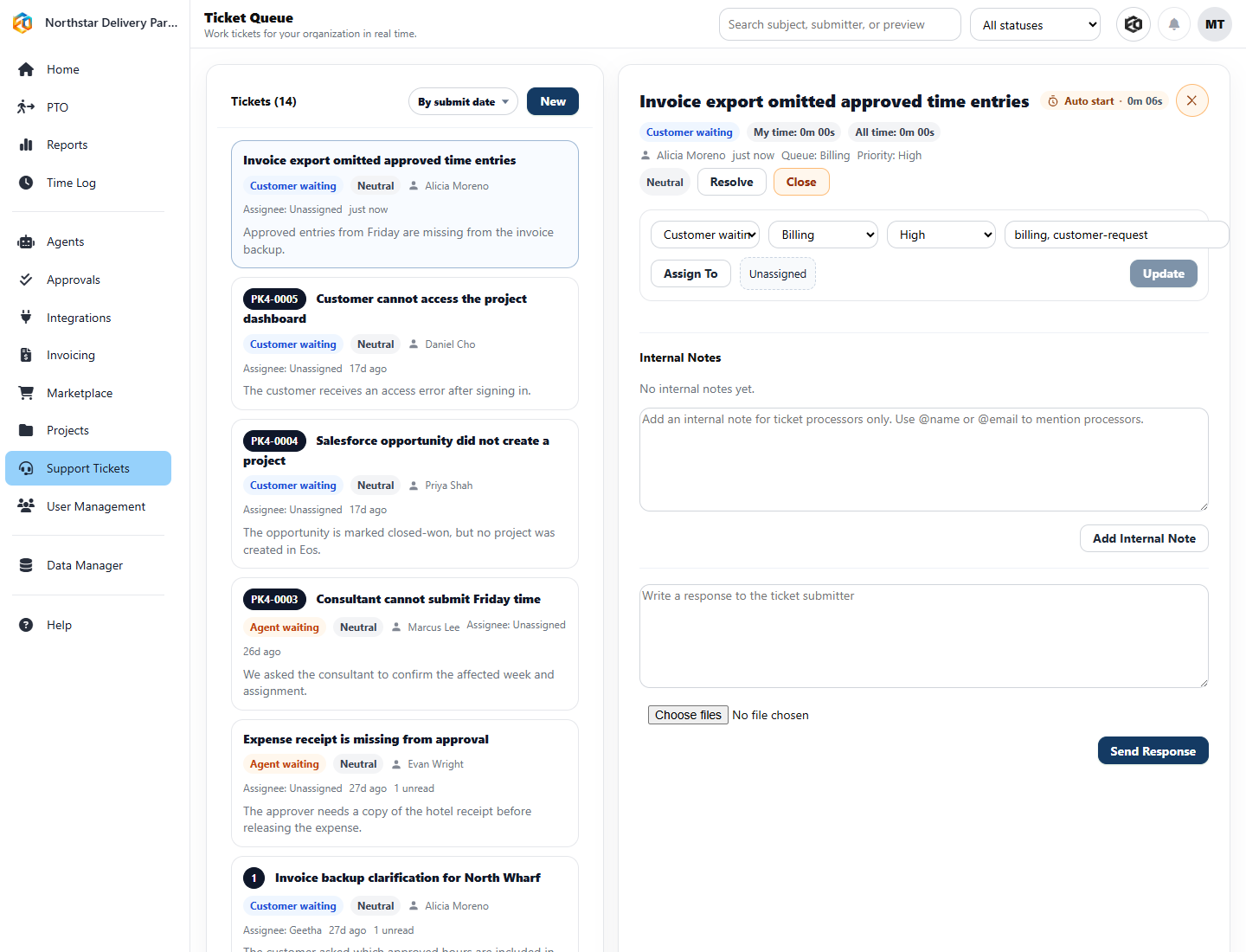
Eos ticket queue with a billing-related customer ticket open for review
One working viewQueue, selected request, priority, owner, status, internal notes, and customer response.
The ticket is shown with the information needed to move it.Northstar Delivery Partners demo data
1

Capture requests cleanly

Tickets can come from the app, trusted systems, or forwarded email so work does not disappear into inboxes.

2

Keep the team aligned

Assignments, notes, replies, status, and priority stay visible for the people responsible for moving the request forward.

3

Connect service to operations

Ticket work can stay close to project context, time tracking, reporting, and agent-assisted follow-up.

Why teams care

Support is easier when it is part of the operating system

Many teams lose time because service work sits in a different place from delivery work. Eos brings those streams closer together, so managers can see what needs attention and agents can help with repeatable follow-through.

Use ticket context when planning work and reviewing capacity
Draft replies, summarize activity, and add internal notes faster
Connect ticket effort to time, reports, and operational signals

Good fit for

  • Customer support tied to project delivery
  • Internal service queues that need ownership
  • Teams that want ticket follow-up without another disconnected tool